


Invoice Maker - MobileBiz Pro
3.6671.00 Reviews
App Specs
- Version
- 1.5.6
- Updated On
- License
- Free
- Downloads
- 10,000+
- Developer
- Mobilebiz Systems
- Categories
- Business
- Platform
- Android
Screenshots
 Analysis by AppCompare
I found Invoice Maker - MobileBiz Pro most useful when I treated it as a practical work notebook rather than a complete accounting system. It is a business app from Mobilebiz Systems for preparing invoices, estimates, and sales orders, while also keeping track of payments, inventory, and reports. The important difference in daily use is that it is designed to keep working offline, which makes it appealing for people who sell, repair, deliver, or consult away from a desk.
My overall impression is that this is a focused tool for small operations that need to record a transaction promptly. It does not try to turn every business process into a large dashboard. Instead, it puts the basic sales paperwork and related records in one place. That simplicity can be a strength when I am standing with a customer and need to create an estimate quickly, but it also becomes a limitation if I expect the depth, automation, or collaboration found in a full cloud accounting platform.
How the current version fits real business work
The app is free to install, with optional in-app purchases ranging from $0.99 to $149.99 per item. It is rated for Everyone, runs on Android 8.0 or later, and the current version is 1.5.6. Those details make it relatively approachable for a small business owner using an older compatible device, although anyone considering paid extras should first decide which parts of the workflow they actually need.
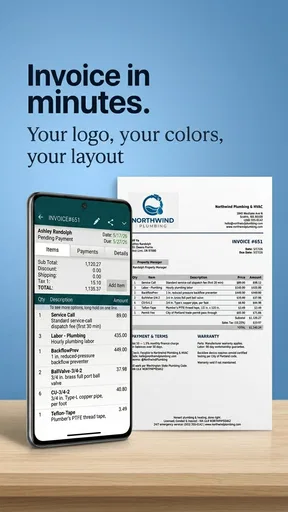
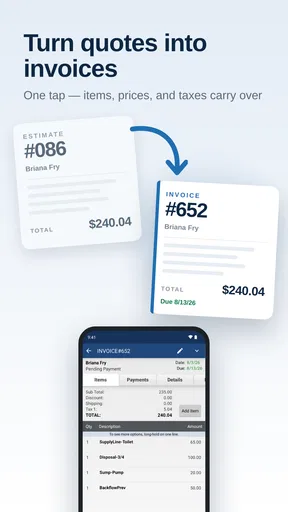
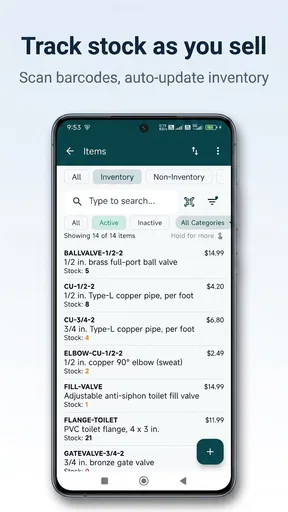
The store short description calls it an invoice maker, but I think that label is narrower than the practical role it can play. I would use it to prepare an estimate before a job, turn an accepted estimate into a sales document, record whether payment has arrived, and review basic business activity later. Inventory tracking adds another useful layer for a tradesperson or small seller who needs to know what was used or sold without maintaining a separate handwritten stock book.
The offline design is the feature I noticed most in terms of workflow. A mobile business does not always have dependable reception inside a customer’s building, at a market, in a workshop, or during travel. Being able to continue entering information in those situations reduces the awkward pause of promising to send paperwork later. I still recommend checking the resulting record carefully before leaving, because an offline-first workflow is only helpful when the information is entered consistently and backed up through the user’s normal device habits.
A sensible workflow for a one-person business
For a typical service call, I would begin with an estimate rather than jumping straight to an invoice. I could outline the labor and materials, show the customer the expected amount, and keep the record attached to that job. Once the work is approved, converting that information into a sales document should reduce retyping and lower the chance of changing a quantity or price by mistake. After payment, marking the transaction clearly gives the reports more value than simply storing a collection of isolated invoices.
That sequence is more useful than creating every invoice from scratch. My first practical tip is to decide on a naming and item-entry routine before using the app heavily. For example, I would keep labor, common materials, and recurring services consistently labeled. The benefit is not just a cleaner document; it also makes inventory and reports easier to interpret later. A small catalog becomes much more valuable when I do not enter “repair,” “repair job,” and “service repair” as three unrelated descriptions.
Worth Reading Before You Choose

EA SPORTS FC Mobile 26 Is a Bigger Football Game, but It Takes Time

Flipboard Shows What News Apps Must Do Beyond the Feed

Switching to Android Auto Means Rethinking Your Driving Routine

Google Calendar Makes a Crowded Week Easier to Manage

Ludo King Makes the Most of the Minutes Between Plans

Baby Panda World Brings Quick Play to Modern Phones, but Its Game Library Feels Busy
A second useful habit is to separate estimates from completed sales. An estimate is a planning and approval document, while a paid invoice represents a finished business event. Mixing the two can make a report look healthier than the cash actually received. The app can help organize these stages, but it cannot replace the discipline of updating payment status immediately after a customer pays.
Where inventory and reports add value
Inventory tracking is most convincing for a business with a manageable range of products or frequently used parts. A mobile technician, small installer, independent retailer, or repair worker may benefit from recording what was sold or consumed alongside the customer transaction. The trade-off is that inventory accuracy depends on every relevant sale being entered. If some jobs are recorded in the app and others remain on paper, the stock view can gradually become misleading.
I would not treat the inventory area as a substitute for warehouse software. It makes sense for operational awareness: knowing whether a commonly used item is running low, checking what was included in a sale, or reviewing materials associated with recent work. A company with several storage locations, complex purchasing, serial-number control, or many staff members will likely need a more specialized system.
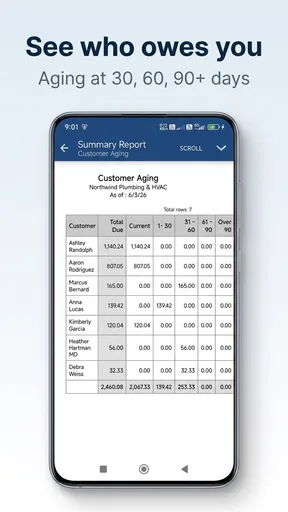
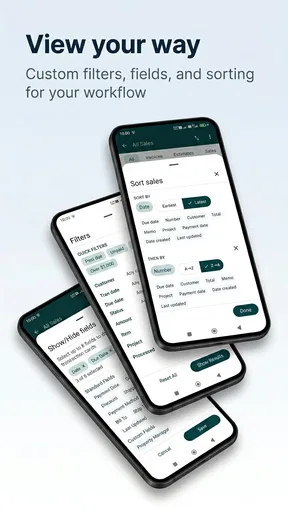
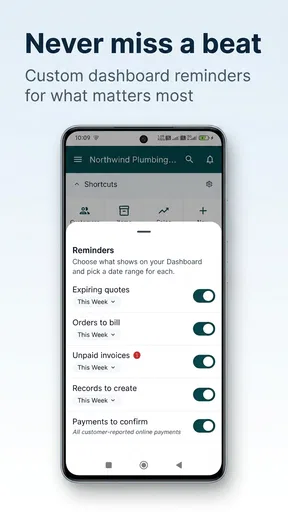
Reports are similarly useful when I want a quick picture of activity rather than a complete financial analysis. They can turn individual records into something easier to review, especially when I am checking unpaid work or looking back over sales. My third practical tip is to use reports as a weekly control point: compare the app’s outstanding records with bank activity and receipts, then correct discrepancies while the details are still fresh.
What the app’s long history means today
This product was released on November 27, 2010, so its long presence helps explain why it feels oriented toward established mobile invoicing habits rather than fashionable business software trends. The version number, 1.5.6, is a useful marker of its current state, but I would not read a version label alone as proof that every modern expectation has been addressed. The important question is whether its straightforward document-and-record workflow matches the way I work now.
Existing users may appreciate that the app remains recognizable as a compact business utility. Someone who already has customers, items, and transaction history arranged inside it may value continuity more than a completely redesigned interface. The cost of changing systems is not only learning a new screen; it can also involve rebuilding item lists, transferring customer details, and changing habits around payment tracking.
At the same time, a long-running app can feel less comfortable to people accustomed to polished, connected services. I would expect a new user to spend time learning where records, reports, and inventory details belong instead of assuming that every function behaves like a modern browser-based accounting suite. That is not automatically a flaw, but it means the best audience is someone who values direct entry and local availability over an expansive ecosystem.
Who should use it, and who should look elsewhere
I’d use this section to decide whether MobileBiz Pro’s compact, offline-friendly sales workflow fits the way you actually work. If you’re comparing it with another invoicing tool, I’d pay particular attention to how many people need to share records and how much stock detail your business depends on; those two needs can quickly make a more connected or specialized system the better choice.
A good match for mobile sellers and service providers
I would recommend Invoice Maker - MobileBiz Pro to a solo operator who needs to make professional-looking business records during the working day and does not want to depend entirely on an internet connection. It is also a reasonable fit for a small team with a simple sales process: estimate, complete the work, invoice, record payment, and review the results. The combination of sales documents, inventory, and reports is more practical than using a separate notes app for each step.
It can be especially handy for someone who works from several locations. A cleaner visiting customers, a market seller, a mobile repair worker, or a contractor moving between job sites may not have the same access to a desktop as an office-based business. In those cases, the ability to capture the transaction at the point of work is a genuine advantage, not merely a convenience.
The Everyone age rating also makes it broadly accessible as a business utility, though the real suitability question is about workflow complexity rather than age. A person who only sends an occasional invoice may find the app more than necessary, while someone handling a steady stream of jobs may appreciate having estimates, sales orders, payments, and reports connected.
When a different option is better
I would steer a growing company toward a more comprehensive accounting or enterprise platform if it needs multiple users working simultaneously, deep tax handling, advanced financial statements, formal purchase workflows, or extensive integrations. Those needs usually require more than a mobile document generator and basic operational records. The same applies to businesses that need sophisticated customer relationship management, recurring billing automation, or detailed permissions by employee.
I would also hesitate to recommend it as the only system for a business with complicated inventory. If stock moves through several locations or depends on batches, serial numbers, purchase orders, and detailed valuation, a dedicated inventory product is likely the safer choice. MobileBiz Pro may still serve as a convenient invoicing companion, but I would not force it to carry responsibilities it was not designed to handle.
There is another trade-off for teams that work across devices. An offline-centered workflow is excellent when connectivity is unreliable, but a business that expects instant shared visibility from a web browser may prefer a cloud-first alternative. Before committing, I would test the exact process for moving information between the people who create estimates, perform work, collect payment, and reconcile the books. A smooth solo workflow can become cumbersome when several people need the same records at once.
Friction I would plan for
The first friction point is consistency. The app can organize invoices and payment records, but it cannot prevent a user from forgetting to mark a payment, entering an item under a new name, or leaving an estimate open after the job is finished. I would establish a short end-of-day checklist: review new documents, update payment status, confirm quantities, and inspect any report that looks unusual.
The second is the boundary between business records and formal accounting. Reports can help me understand activity, but I would still keep proper financial records and follow the requirements relevant to my business. I would not assume that an invoice inside the app automatically covers tax filing, bookkeeping review, or legal retention obligations.
The third is the purchase decision. Since optional items can reach $149.99, I would avoid buying extras simply because they appear available. I would first use the free portion to map my real workflow, identify the task that is slowing me down, and then decide whether a paid addition solves that specific problem. That approach is more sensible than paying for features before I know whether I will use them every week.
Questions I would settle before relying on it
Can it work without an internet connection? Its central appeal is offline operation, so I would use that capability deliberately rather than treating it as an emergency backup. I would create a test estimate in a place with connectivity disabled, inspect the saved record, and then verify how my normal backup or transfer routine handles it when I reconnect. This simple test is more useful than assuming offline and synchronization behavior will match a cloud application.
Can it replace my accountant’s software? I would say no for most businesses. It can support the front end of selling and collecting, but accounting, taxes, reconciliation, and compliance may require a separate process. I would export or transfer the information in the manner available to me and agree with my accountant on what records need to be retained.
Is it suitable for inventory? Yes, when the stock list is modest and the main goal is tracking items associated with sales or jobs. I would skip it as the primary inventory system if my operation involves complex warehouse control or frequent multi-location movement.
Is it worth trying when I already use spreadsheets? For a small business, it can be worthwhile if spreadsheets are causing repeated typing or missed payment updates. The advantage is the connection between estimates, sales documents, inventory, and reports. If my spreadsheet already handles a complicated custom process perfectly, switching may not justify the learning and migration effort.
What I would watch as an existing user
I would pay attention to how comfortably the current version handles the records I create most often, especially after the business grows. The key signs are not flashy additions; they are whether entering a transaction remains quick, whether old records stay easy to find, and whether reports continue to reflect the way I actually sell. I would also watch the practical cost of optional purchases and make sure they align with a clearly identified need.
For someone evaluating the app today, I suggest a small trial rather than a theoretical comparison. Create one estimate, turn it into a sales document, record a partial or completed payment in the way your business normally handles it, add a representative inventory item, and inspect the resulting report. Then repeat the exercise offline. That test reveals far more about fit than the short description alone.
The app has an average rating of 3.6 from around 2 thousand ratings, with 671 written reviews, and it has passed 10 thousand installs. I read those figures as evidence of a real but not universally loved niche product: established enough to attract regular use, yet not so broadly praised that I would recommend it without testing the workflow. The numbers should inform expectations, not replace hands-on judgment.
My final view is that Invoice Maker - MobileBiz Pro earns its place when the priority is capturing sales work quickly, even away from reliable internet. I like the practical chain from estimate to sale, payment, inventory, and report, and I can see why a solo operator would prefer that over juggling paper, notes, and a spreadsheet. I would not choose it for complex accounting, advanced stock control, or a large collaborative organization. For the right small business, though, its focused approach can be more useful than a heavier system that takes longer to operate.
If I were recommending it to a friend, I would say: try it with one real week of work, keep your item names and payment statuses consistent, and judge it by whether it reduces repeated entry without creating new bookkeeping confusion. That is where this free business app is strongest, and it is also the clearest way to discover whether its limits matter to you.
Pros
- Creates professional invoices directly from your Android or iOS device.
- Supports estimates
- receipts
- expenses
- and customer records in one app.
- Lets you customize invoice templates with your branding and business details.
- Works well for freelancers and small businesses needing mobile billing tools.
- Can help track payment status and outstanding balances more efficiently.
Cons
- Advanced features may require a paid subscription or in-app purchase.
- The interface can feel crowded when managing many customers or invoices.
- Some accounting and tax integrations may be limited compared with desktop software.
- Cloud syncing and backups may depend on account settings or internet access.
- Not ideal for larger companies needing complex inventory or payroll management.
FAQs for Invoice Maker - MobileBiz Pro
What is Invoice Maker - MobileBiz Pro used for?
Invoice Maker - MobileBiz Pro is designed to help freelancers, contractors, consultants, and small businesses create and manage invoices from a mobile device. During testing, the app was useful for preparing professional-looking invoices, adding customer and business details, listing products or services, applying taxes or discounts, and keeping billing information organized without relying on a desktop accounting program.
Can I create and send professional invoices from my phone?
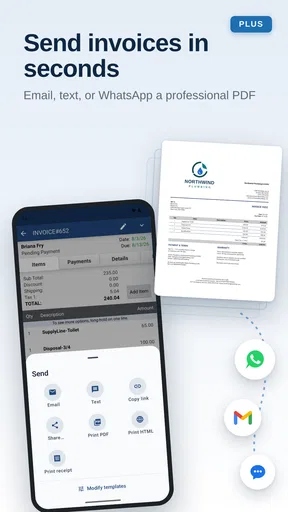
Yes. The app lets you build invoices using customizable business, customer, item, pricing, tax, and payment details. Once an invoice is ready, it can generally be exported or shared through available options such as email or messaging applications. Before downloading, users should check whether their preferred sharing method and invoice format are supported on their specific Android or iOS device.
Does Invoice Maker - MobileBiz Pro support estimates, receipts, and other documents?
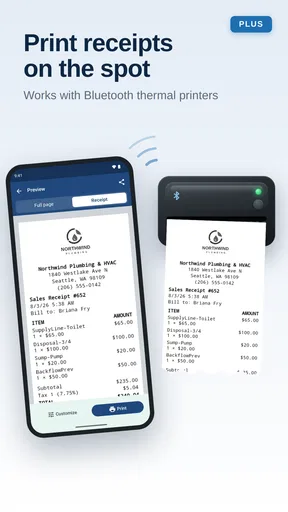
MobileBiz Pro is intended to support more than basic invoice creation, although the exact document types and available tools can depend on the version, platform, and subscription plan. Users may find features for estimates, receipts, customer records, product catalogs, payment tracking, and business reports. It is worth reviewing the current feature list before assuming every accounting document is included.
Is Invoice Maker - MobileBiz Pro suitable for managing a small business?
The app can be a practical choice for a small operation that mainly needs mobile invoicing, customer management, payment status tracking, and simple business records. Its convenience is strongest for independent professionals and teams with straightforward billing needs. However, businesses requiring advanced inventory control, payroll, extensive bookkeeping, or complex tax compliance may still need dedicated accounting software alongside the app.
Is Invoice Maker - MobileBiz Pro free, and are there in-app purchases?
The app may offer free access to some invoice-making functions while reserving certain templates, automation tools, reports, branding options, or expanded business features for paid plans or in-app purchases. Pricing and limitations can change over time, so users should check the current Google Play Store or Apple App Store listing before downloading. Also review trial terms and renewal conditions carefully.


